powshredGet the app

THE SNOW-DAY DECISION

PowShred vs AccuWeather for backcountry skiing and riding

AccuWeather helps you follow the weather at a location. PowShred helps you choose among riding zones and days. The difference matters when your question moves from “Will it snow?” to “Where should we ski, snowboard, or take the sleds this weekend?”

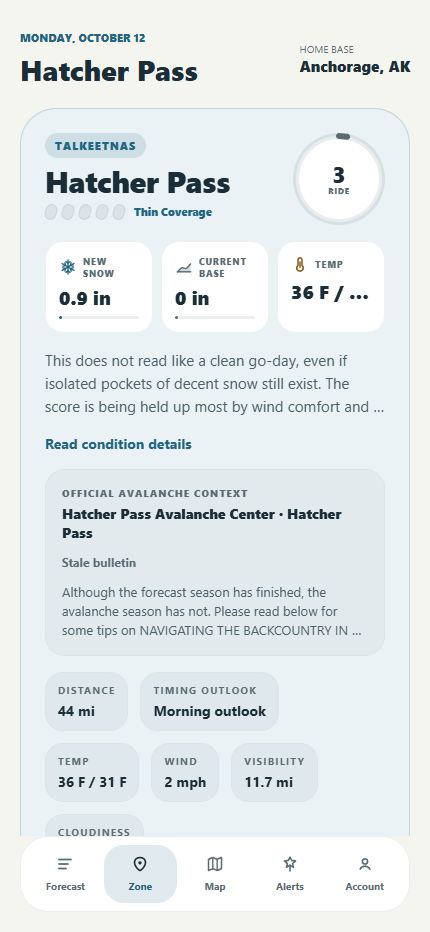
PowShred zone detail screen showing a riding-area forecast
Explore the forecast for a riding zone.

START WITH THE DECISION

Which tool fits your next day out?

PowShred

Compare the riding setup.

Choose PowShred for comparing supported riding zones by Ride Score or snow depth, then inspecting the elevation bands and weather history behind the setup. It is built around the destination decision, with a map and saved-zone feed to keep the candidates together.

AccuWeather

Where it earns a place.

AccuWeather has useful winter features too: WinterCast covers snow and ice, and MinuteCast shows near-term precipitation timing. Keep those capabilities in mind when you need a location-based forecast. PowShred does not offer a MinuteCast-style nowcast.

FOR THE WAY YOU RIDE

What does PowShred add to a backcountry plan?

PowShred adds a destination-first snow workflow to a location weather forecast: rank supported riding zones, inspect their terrain-band snow information, and read the modeled weather sequence behind the score.

  • Shortlist a ski tour or backcountry snowboard area with Ride Score, then read the positive drivers and penalties.
  • Switch to Snow Tracker to compare depth at the terrain band you expect to ride.
  • Use Pro Goldilocks alerts to watch for nearby high-scoring setups, rather than only precipitation at a saved location.

SIDE BY SIDE

A feature checklist for riders

Compare the tools for each part of your plan. Features can vary by location and subscription. “Not documented” means the cited product information does not describe that capability.

PowShred and AccuWeather: capabilities relevant to riding decisions
Your planning taskPowShredAccuWeather
Rank possible riding destinationsPowShred Included

Saved and nearby zones ranked by Ride Score, with positive drivers and limiting factors in zone detail.

AccuWeather Not documented

A ranked riding-zone feed is not described in the cited app feature list. [1]

Snow information for the tripPowShred Included

Snow Tracker ranks by depth, then new snow. Choose average, upper, mid, or lower elevation when data is available.

AccuWeather Included

WinterCast snow and ice charts; hourly and daily weather views. [1]

Explain the snow setupPowShred Included

Weather-chain timeline and score explanations show modeled influences such as warming, rain, crust, and wind.

AccuWeather Different approach

RealFeel describes how the weather feels; forecast details provide location-based weather context. [2]

Time precipitation in the next few hoursPowShred Different approach

Hourly temperature and daylight in zone detail; no minute-by-minute precipitation nowcast.

AccuWeather Included

MinuteCast provides near-term minute-by-minute precipitation timing; the available horizon varies by app version. [1]

Watch for a promising riding windowPowShred Paid feature

Saved-zone alerts, daily digests, weekend outlooks, and nearby Goldilocks alerts. Email and push options.

AccuWeather Not documented

A nearby ride-score trigger is not described in the cited product information. [1]

A SNOW-DAY PLANNING EXAMPLE

Planning a snowmobile day after a warm spell

You have one free day and two possible riding areas. Snowfall totals alone leave questions about the existing base and what happened before the storm.

  1. Compare the base and the new snow

    Open Snow Tracker for your saved zones. Look at current depth separately from projected depth and new snowfall; a thin base plus fresh snow is a different setup from a deeper existing pack.

  2. Read what shaped the surface

    Open each zone’s weather chain and score penalties. Look for warming, rain, or wind influences that might complicate the new snow. These are modeled signals, not a report from someone on the ground.

  3. Check the hours around your outing

    Review the zone’s hourly temperature and daylight. MinuteCast can add short-term precipitation context at a supported location, but neither tool establishes trail opening, legal motorized access, or terrain safety.

INSIDE POWSHRED

Read the setup behind the snow total.

Start with nearby or saved zones, then switch between Ride Score and Snow Tracker. Open a zone for the weather chain, score drivers and penalties, terrain bands, hourly temperature and daylight, and a 14-day outlook with confidence labels.

Core feed, map, and area outlooks are free. Pro adds saved-zone alerts, daily digests, weekend outlooks, and nearby Goldilocks alerts for high-scoring setups. Email and push delivery are configurable.

Estimated depth adds forecast snowfall to current depth; it excludes settling, melt, and wind redistribution. Coverage and data availability vary by zone. Ride Score is planning context, not an avalanche danger rating. Public avalanche bulletins appear only where mapped and available.

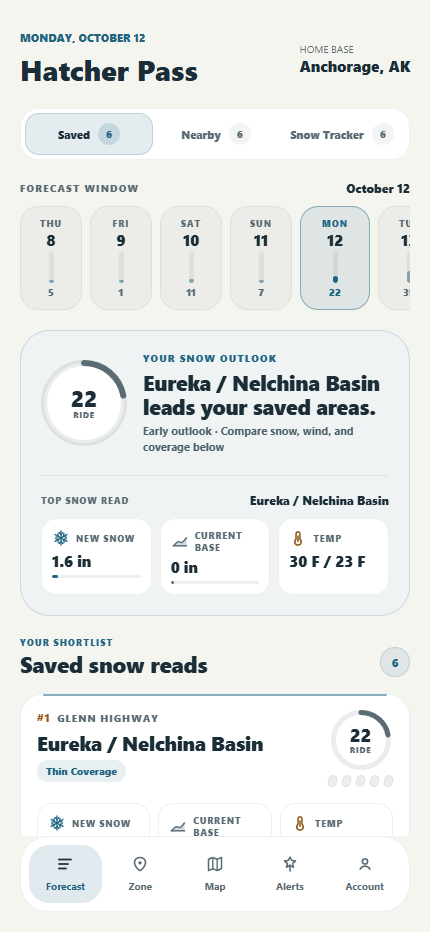
PowShred forecast feed for comparing riding areas
Compare areas before picking a destination.

BEFORE YOU CHOOSE

Questions riders ask

Is AccuWeather enough for planning a ski or snowmobile day?

It provides weather inputs, including winter precipitation information. PowShred adds a riding-zone workflow: ranked alternatives, elevation-based snow context, a weather chain, and score explanations. Which you need depends on whether you already know your destination or are still choosing where to ride.

Is PowShred more accurate than AccuWeather for snow?

A feature comparison does not establish a forecast-accuracy advantage. Ride Score organizes modeled conditions for planning; it is not proof of better snowfall accuracy or a promise of good riding.

Product references

Features and subscription plans can change. Product information checked November 1, 2026.

  1. AccuWeather app listing: WinterCast and forecast features
  2. AccuWeather App FAQ: MinuteCast, RealFeel, and mapping layers

SKIS. BOARDS. SLEDS.

Find the zone.
Watch the window.

Explore the map, save the places you ride, and start comparing the snow setup.

Get PowShred on Google Play ↗