Compare the riding setup.
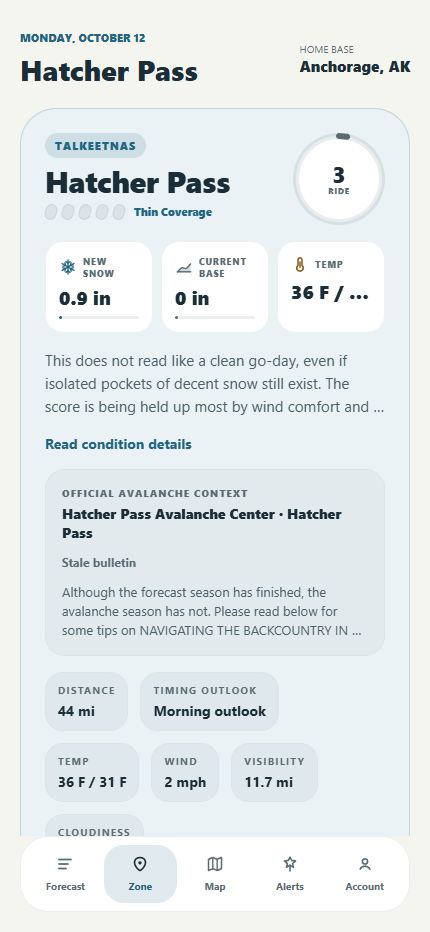
Choose PowShred when the first task is comparing candidate areas and days. Its depth-first Snow Tracker and Ride Score views lead into the weather chain and terrain-band detail for each supported zone.
 powshredGet the app
THE SNOW-DAY DECISION
Both services account for elevation, but they organize the decision differently. Snow-Forecast offers resort forecasts at top-lift, mid-mountain, and bottom-lift elevations. PowShred lets you rank riding zones, then inspect lower, mid, and upper terrain summaries where data is available.
START WITH THE DECISION
Choose PowShred when the first task is comparing candidate areas and days. Its depth-first Snow Tracker and Ride Score views lead into the weather chain and terrain-band detail for each supported zone.
Snow-Forecast offers resort elevation forecasts, freezing-level information, snowfall maps, and snow reports. Both apps provide elevation-aware snow information; Snow-Forecast organizes the forecast around resort elevations.
FOR THE WAY YOU RIDE
PowShred combines elevation-aware snow information with a ranked riding-zone feed and a weather-chain explanation. Snow-Forecast already adjusts resort forecasts by elevation; PowShred’s added focus is the supported-area shortlist and the snow setup behind each score.
SIDE BY SIDE
Compare the tools for each part of your plan. Features can vary by location and subscription. “Not documented” means the cited product information does not describe that capability.
| Your planning task | PowShred | Snow-Forecast |
|---|---|---|
| Choose the elevation you care about | PowShred Included Lower, mid, and upper terrain summaries include modeled snow and wind-scour information where available. | Snow-Forecast Included Top-lift, mid-mountain, and bottom-lift resort forecasts. [1] |
| Rank areas by snow depth | PowShred Included Snow Tracker ranks by depth, then new snow. Choose average, upper, mid, or lower elevation when data is available. | Snow-Forecast Different approach Resort snow reports and forecasts organize snow information by ski destination. [1] |
| Interpret warm or rain events | PowShred Included Weather-chain timeline and score explanations show modeled influences such as warming, rain, crust, and wind. | Snow-Forecast Included Freezing-level information and snow/rain forecasting help interpret a resort forecast; a different presentation. [2] |
| Start with a modeled ride shortlist | PowShred Included Saved and nearby zones ranked by Ride Score, with positive drivers and limiting factors in zone detail. | Snow-Forecast Not documented A ranked riding-zone score with drivers and penalties is not described in the cited product information. [1] |
| Explore broader snowfall patterns | PowShred Different approach Zone map layers emphasize Ride Score and current or projected depth. | Snow-Forecast Included Snowfall forecast maps and resort overviews. [1] |
A SNOW-DAY PLANNING EXAMPLE
An elevation-sensitive storm can make a single resort or zone headline misleading for the terrain you actually intend to ride.
Identify whether your planned terrain is closer to the lower, mid, or upper part of the riding area. Do not substitute a summit forecast for an approach that stays much lower.
Use PowShred’s elevation selector and zone detail to inspect the available snow summaries. New snowfall is an accumulation forecast; projected depth is a separate estimate.
Check the weather chain and penalties for rain or warming. For a resort, elevation-specific and freezing-level forecasts can add context, but neither tool confirms the surface on every run.
INSIDE POWSHRED
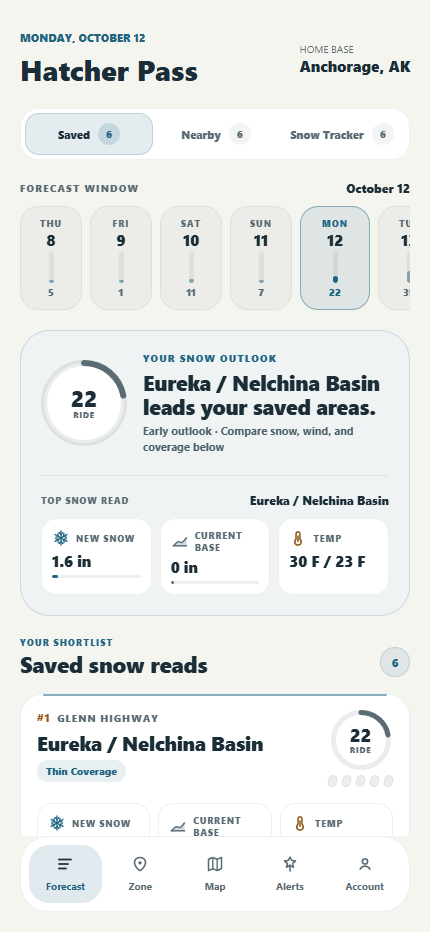
Start with nearby or saved zones, then switch between Ride Score and Snow Tracker. Open a zone for the weather chain, score drivers and penalties, terrain bands, hourly temperature and daylight, and a 14-day outlook with confidence labels.
Core feed, map, and area outlooks are free. Pro adds saved-zone alerts, daily digests, weekend outlooks, and nearby Goldilocks alerts for high-scoring setups. Email and push delivery are configurable.
Estimated depth adds forecast snowfall to current depth; it excludes settling, melt, and wind redistribution. Coverage and data availability vary by zone. Ride Score is planning context, not an avalanche danger rating. Public avalanche bulletins appear only where mapped and available.
BEFORE YOU CHOOSE
Yes. Its official overview describes forecasts at three resort elevations, and its FAQ explains elevation and freezing-level considerations. PowShred’s distinction is the ranked riding-zone workflow and the way it exposes snow-process context.
No. New snowfall is the accumulation during a forecast window. PowShred’s estimated depth adds forecast snowfall to current depth through the selected day, without settling, melt, or wind redistribution. Missing inputs are shown as unavailable.
Features and subscription plans can change. Product information checked November 1, 2026.
SKIS. BOARDS. SLEDS.
Explore the map, save the places you ride, and start comparing the snow setup.
Get PowShred on Google Play ↗