powshredGet the app

THE SNOW-DAY DECISION

PowShred vs Windy.com for snow, wind, and riding decisions

Windy.com is built for exploring weather maps, model views, and conditions at a location. PowShred turns supported riding zones into a snow-focused shortlist with Ride Score and depth views. This comparison covers Windy.com, not the separate Windy.app service.

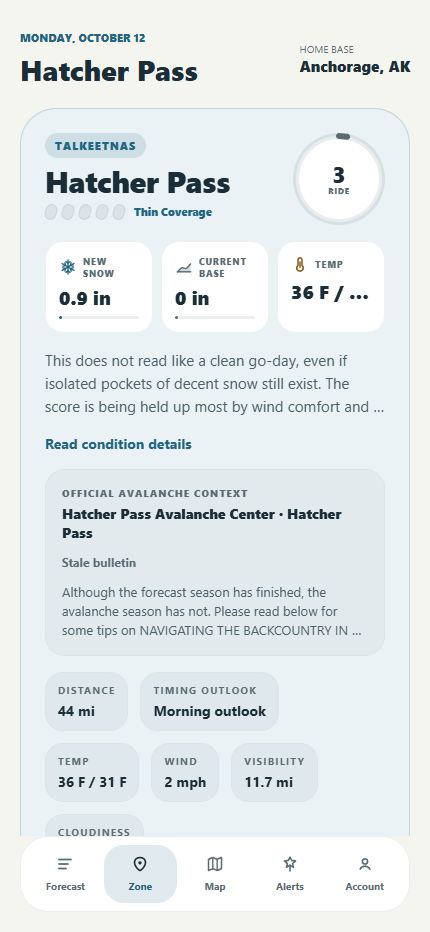
PowShred zone detail screen showing a riding-area forecast
Explore the forecast for a riding zone.

START WITH THE DECISION

Which tool fits your next day out?

PowShred

Compare the riding setup.

Choose PowShred when you want a destination shortlist and an explanation of the snow setup. The zone view connects weather-chain history, snow depth, terrain bands, and score factors so you can inspect why an area ranks where it does.

Windy.com

Where it earns a place.

Windy.com is the fit for manually exploring weather-model views and broader map layers. PowShred blends its weather inputs for zone analysis rather than offering the same user-facing model picker.

FOR THE WAY YOU RIDE

What does PowShred add to a backcountry plan?

PowShred turns its weather and snow inputs into a riding-zone shortlist, terrain-band summaries, and an explanation of the snow setup. Windy.com gives you model and map controls for examining the weather yourself.

  • Start with ranked backcountry skiing or riding zones instead of interpreting a separate set of weather layers for every candidate.
  • Read wind effects alongside weather-chain events and exposed score penalties.
  • Use depth-first Snow Tracker sorting when the existing base matters more to your plan than the largest forecast snowfall.

SIDE BY SIDE

A feature checklist for riders

Compare the tools for each part of your plan. Features can vary by location and subscription. “Not documented” means the cited product information does not describe that capability.

PowShred and Windy.com: capabilities relevant to riding decisions
Your planning taskPowShredWindy.com
Switch between weather model viewsPowShred Different approach

Blended zone analysis; no equivalent user-facing weather-model picker.

Windy.com Included

Location forecasts allow switching model views. [1]

Start with a ranked snow-day shortlistPowShred Included

Saved and nearby zones ranked by Ride Score, with positive drivers and limiting factors in zone detail.

Windy.com Not documented

A ranked riding-zone feed with score explanations is not described in the cited product information. [1]

Explore weather over a wider regionPowShred Different approach

Zone map layers focus on Ride Score and current or projected snow depth.

Windy.com Included

Weather maps support multiple models, layers, and isolines. [2]

Read wind as part of the snow setupPowShred Included

Weather-chain timeline and score explanations show modeled influences such as warming, rain, crust, and wind.

Windy.com Different approach

Wind and other weather fields can be inspected through forecast and map views. [2]

Compare terrain-band snow depthPowShred Included

Snow Tracker ranks by depth, then new snow. Choose average, upper, mid, or lower elevation when data is available.

Windy.com Not documented

An elevation-selected riding-zone depth ranking is not described in the cited product information. [1]

A SNOW-DAY PLANNING EXAMPLE

The storm total looks good, but the wind forecast does not

You want to understand whether to keep watching a zone or consider another area after the storm.

  1. Inspect the zone’s limiting factors

    Read PowShred’s score penalties, weather chain, and elevation-band wind-scour summaries where supplied. Wind effects are modeled indicators, not observations of individual slopes.

  2. Compare another area and day

    Use the ranked feed and 14-day outlook to investigate alternatives. Check confidence labels before treating a later-day opportunity as a settled forecast.

  3. Examine the broader weather pattern

    Model and map exploration can add context. Keep location, elevation, valid time, and units aligned when comparing views rather than selecting the model with the most attractive snowfall number.

INSIDE POWSHRED

Read the setup behind the snow total.

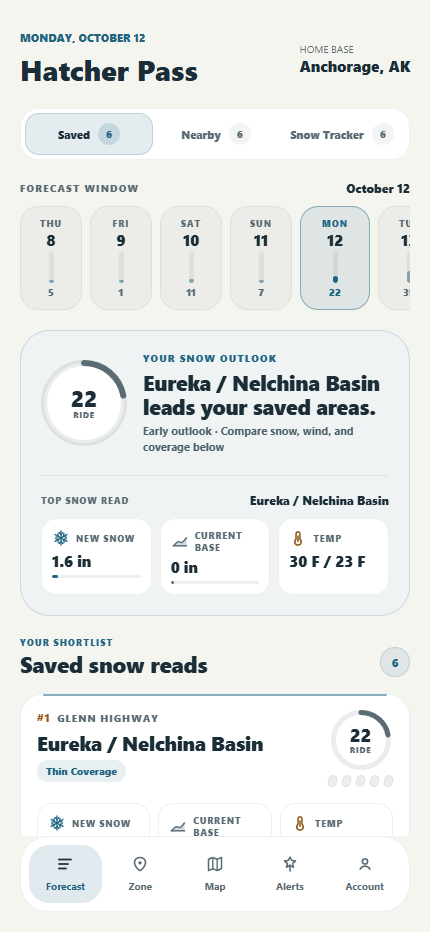
Start with nearby or saved zones, then switch between Ride Score and Snow Tracker. Open a zone for the weather chain, score drivers and penalties, terrain bands, hourly temperature and daylight, and a 14-day outlook with confidence labels.

Core feed, map, and area outlooks are free. Pro adds saved-zone alerts, daily digests, weekend outlooks, and nearby Goldilocks alerts for high-scoring setups. Email and push delivery are configurable.

Estimated depth adds forecast snowfall to current depth; it excludes settling, melt, and wind redistribution. Coverage and data availability vary by zone. Ride Score is planning context, not an avalanche danger rating. Public avalanche bulletins appear only where mapped and available.

PowShred forecast feed for comparing riding areas
Compare areas before picking a destination.

BEFORE YOU CHOOSE

Questions riders ask

Does PowShred let me choose ECMWF, GFS, or another model?

PowShred provides modeled zone outputs rather than a weather-model selection menu. Its backend uses public-source inputs including HRRR and GFS, together with terrain and available snow analysis.

Can a wind map tell me whether a slope has good powder?

A wind map is a weather input, not a direct snow-surface observation. PowShred adds modeled snow-history and terrain-band context, but it also cannot confirm the snow on a particular slope or establish avalanche safety.

Product references

Features and subscription plans can change. Product information checked November 1, 2026.

  1. Windy.com: Location forecasts and model-selection product update
  2. Windy: Official map and forecast capabilities

SKIS. BOARDS. SLEDS.

Find the zone.
Watch the window.

Explore the map, save the places you ride, and start comparing the snow setup.

Get PowShred on Google Play ↗