Compare the riding setup.
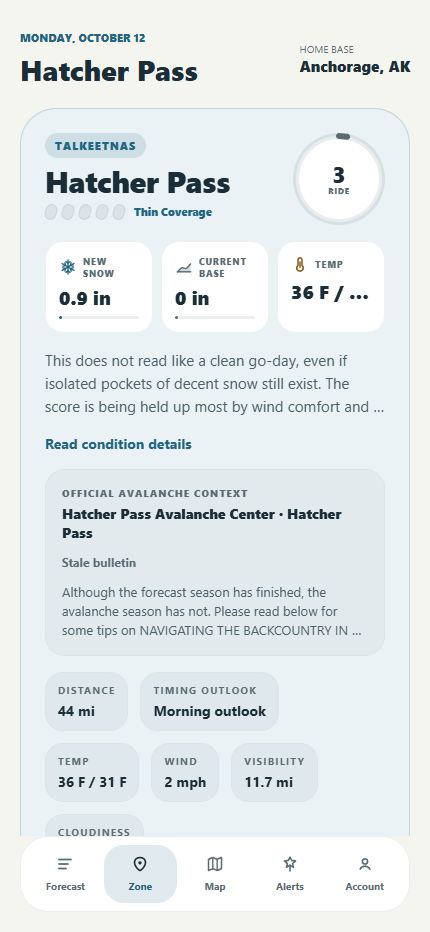
Use PowShred when you have flexibility over the destination or day. Ride Score and Snow Tracker let you compare supported zones, while the weather chain and elevation bands help you read beyond the accumulation number.
 powshredGet the app
THE SNOW-DAY DECISION
The Weather Channel offers detailed radar tools and extended hourly forecasts. PowShred takes a different starting point: compare the areas you could ride and investigate why a day’s snow setup looks promising or limited.
START WITH THE DECISION
Use PowShred when you have flexibility over the destination or day. Ride Score and Snow Tracker let you compare supported zones, while the weather chain and elevation bands help you read beyond the accumulation number.
The Weather Channel’s Premium offering includes 72-hour future radar, advanced map layers, and eight days of hourly forecasts. PowShred’s zone map does not offer that radar product.
FOR THE WAY YOU RIDE
PowShred focuses on choosing the riding area and day, while The Weather Channel’s radar and hourly forecasts help you follow a storm. PowShred connects the snow totals to a ranked zone feed and explanations of the setup.
SIDE BY SIDE
Compare the tools for each part of your plan. Features can vary by location and subscription. “Not documented” means the cited product information does not describe that capability.
| Your planning task | PowShred | The Weather Channel |
|---|---|---|
| Compare snow-day destinations | PowShred Included Saved and nearby zones ranked by Ride Score, with positive drivers and limiting factors in zone detail. | The Weather Channel Different approach Location forecasts and weather maps organize the weather around places you select. [1] |
| Compare snow depth and weather | PowShred Included Snow Tracker ranks by depth, then new snow. Choose average, upper, mid, or lower elevation when data is available. | The Weather Channel Paid feature Premium offers eight days of hourly weather forecasts and advanced map layers; a different view from zone-depth ranking. [1] |
| Track an approaching storm | PowShred Different approach Zone outlooks and modeled weather context; no live radar layer. | The Weather Channel Paid feature Premium includes 72-hour future radar. [1] |
| See why the riding setup changes | PowShred Included Weather-chain timeline and score explanations show modeled influences such as warming, rain, crust, and wind. | The Weather Channel Not documented A snow-process timeline with riding-score drivers is not described in the cited feature information. [1] |
| Get updates for riding opportunities | PowShred Paid feature Saved-zone alerts, daily digests, weekend outlooks, and nearby Goldilocks alerts. Email and push options. | The Weather Channel Different approach Local weather notifications provide broader weather updates. [1] |
A SNOW-DAY PLANNING EXAMPLE
A storm is expected over the weekend, but the snowiest day is not automatically the day you want to ride.
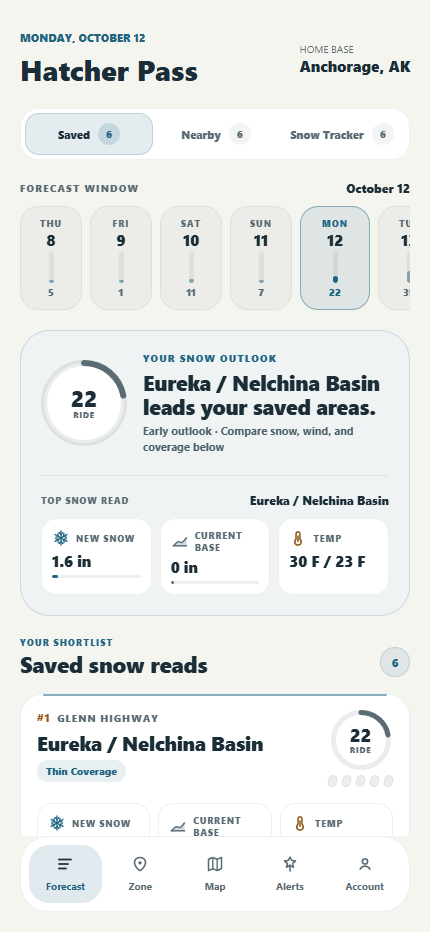
Switch days in PowShred’s feed or zone outlook. Compare Ride Score, snowfall, wind, temperature, and available visibility information rather than choosing the largest snow total in isolation.
Read the positive factors, penalties, and weather timeline for each zone. Check whether wind or warming changes the modeled setup after the snowfall.
Use current weather information as departure approaches. Radar and precipitation timing add storm context; official access reports and local avalanche guidance remain separate planning checks.
INSIDE POWSHRED
Start with nearby or saved zones, then switch between Ride Score and Snow Tracker. Open a zone for the weather chain, score drivers and penalties, terrain bands, hourly temperature and daylight, and a 14-day outlook with confidence labels.
Core feed, map, and area outlooks are free. Pro adds saved-zone alerts, daily digests, weekend outlooks, and nearby Goldilocks alerts for high-scoring setups. Email and push delivery are configurable.
Estimated depth adds forecast snowfall to current depth; it excludes settling, melt, and wind redistribution. Coverage and data availability vary by zone. Ride Score is planning context, not an avalanche danger rating. Public avalanche bulletins appear only where mapped and available.
BEFORE YOU CHOOSE
The Weather Channel offers location-based weather, hourly forecasts, radar, and map layers. PowShred organizes snow information around supported riding zones: compare Ride Score and snow depth, then inspect modeled influences on the snow setup.
PowShred combines the destination shortlist with snow depth, new snow, Ride Score, elevation summaries, and weather-chain context. You can inspect an area across a 14-day outlook, with later days explicitly treated as early outlooks.
Features and subscription plans can change. Product information checked November 7, 2026.
SKIS. BOARDS. SLEDS.
Explore the map, save the places you ride, and start comparing the snow setup.
Get PowShred on Google Play ↗