powshredGet the app

THE SNOW-DAY DECISION

PowShred vs Weather Underground: snowpack or station weather?

Weather Underground is useful for examining local weather and station observations. PowShred organizes modeled snow conditions around riding zones. A station temperature and a zone’s snow-depth outlook are different pieces of evidence when you are choosing where to ride.

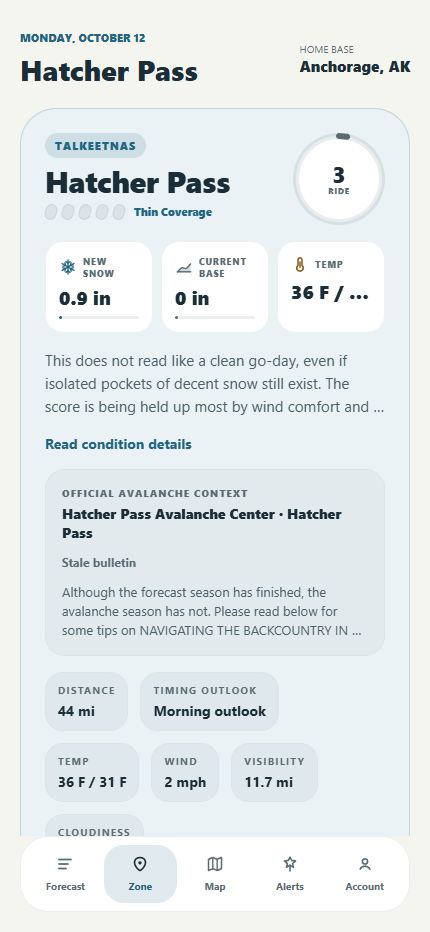
PowShred zone detail screen showing a riding-area forecast
Explore the forecast for a riding zone.

START WITH THE DECISION

Which tool fits your next day out?

PowShred

Compare the riding setup.

Choose PowShred to compare snow depth, new snow, and modeled riding conditions across supported areas. Snow Tracker’s elevation selector and the zone weather chain help you investigate how the setup varies beyond a single observation point.

Weather Underground

Where it earns a place.

Weather Underground’s personal weather-station network and station selection provide local observational context. PowShred uses public-source weather and snow inputs; it does not provide that same personal-station network.

FOR THE WAY YOU RIDE

What does PowShred add to a backcountry plan?

PowShred organizes snow information by riding zone and terrain band. That gives backcountry skiers and snowboarders a way to compare possible destinations alongside the station observations available in Weather Underground.

  • Compare lower, mid, and upper terrain summaries instead of applying a valley station reading to the whole mountain.
  • Read current depth, forecast new snow, and estimated depth as separate values.
  • Use the weather chain to investigate rain or warming before the latest snowfall, then compare the score’s limiting factors.

SIDE BY SIDE

A feature checklist for riders

Compare the tools for each part of your plan. Features can vary by location and subscription. “Not documented” means the cited product information does not describe that capability.

PowShred and Weather Underground: capabilities relevant to riding decisions
Your planning taskPowShredWeather Underground
Compare riding-area snow depthPowShred Included

Snow Tracker ranks by depth, then new snow. Choose average, upper, mid, or lower elevation when data is available.

Weather Underground Different approach

Local forecasts and station observations provide weather context for a selected place. [1]

Inspect nearby station observationsPowShred Different approach

Public-source observations and snow inputs support zone analysis; not the same personal-station network.

Weather Underground Included

Personal and other weather stations, with a station-selection option for current conditions. [1]

Compare lower and upper terrainPowShred Included

Lower, mid, and upper terrain summaries include modeled snow and wind-scour information where available.

Weather Underground Different approach

Station observations describe the station site, rather than a lower/mid/upper riding-zone summary. [1]

Read weather history as snow contextPowShred Included

Weather-chain timeline and score explanations show modeled influences such as warming, rain, crust, and wind.

Weather Underground Different approach

Historical weather is available; the same modeled snow-process explanation is not established by that feature. [2]

Follow saved-zone riding opportunitiesPowShred Paid feature

Saved-zone alerts, daily digests, weekend outlooks, and nearby Goldilocks alerts. Email and push options.

Weather Underground Not documented

Ride-score-based opportunity alerts are not described in the cited product information. [1]

A SNOW-DAY PLANNING EXAMPLE

A nearby station is above freezing. What about the riding zone?

You see a warm reading near town while deciding whether to head higher into the mountains. Applying that reading to the whole zone could hide important differences.

  1. Locate the observation

    Check the station’s site, elevation, and update time. A sheltered valley station and exposed upper terrain can experience different weather.

  2. Compare the terrain bands

    In PowShred, inspect the zone’s lower, mid, and upper summaries where supplied. Snow Tracker lets you compare depth at the selected band instead of treating the whole area as one number.

  3. Inspect the sequence of events

    Read the weather chain for warm or rain events followed by new snow. Treat that modeled explanation as context, and keep missing data or a low-confidence outlook visible in your decision.

INSIDE POWSHRED

Read the setup behind the snow total.

Start with nearby or saved zones, then switch between Ride Score and Snow Tracker. Open a zone for the weather chain, score drivers and penalties, terrain bands, hourly temperature and daylight, and a 14-day outlook with confidence labels.

Core feed, map, and area outlooks are free. Pro adds saved-zone alerts, daily digests, weekend outlooks, and nearby Goldilocks alerts for high-scoring setups. Email and push delivery are configurable.

Estimated depth adds forecast snowfall to current depth; it excludes settling, melt, and wind redistribution. Coverage and data availability vary by zone. Ride Score is planning context, not an avalanche danger rating. Public avalanche bulletins appear only where mapped and available.
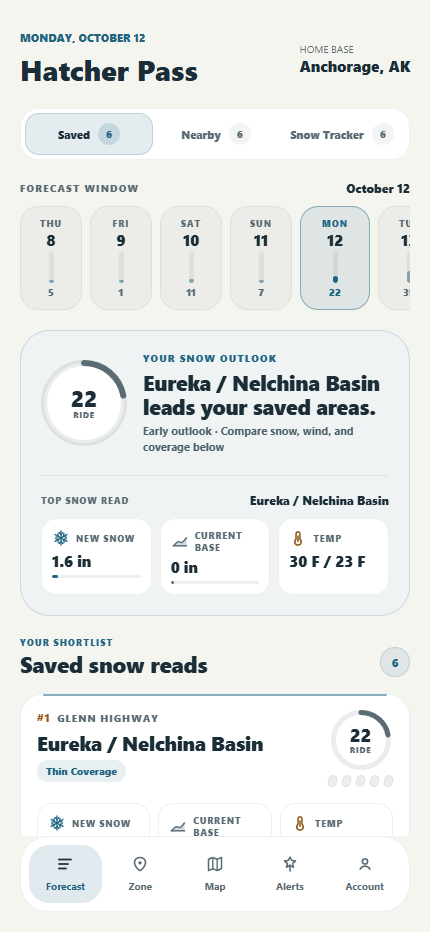
PowShred forecast feed for comparing riding areas
Compare areas before picking a destination.

BEFORE YOU CHOOSE

Questions riders ask

Can a Weather Underground station tell me the mountain snow depth?

Do not assume a station’s temperature or precipitation reading is a snow-depth measurement for nearby terrain. Check which variables the station reports and where it is located. PowShred labels depth and estimated depth separately and can show missing values.

Does PowShred measure every riding zone directly?

No. Its zone forecasts and snow summaries are modeled using weather, terrain, and available snow-analysis inputs. Elevation bands and Ride Score should be read as modeled planning information, not direct measurements of every slope.

Product references

Features and subscription plans can change. Product information checked November 1, 2026.

  1. Weather Underground: About Our Data, current conditions and station selection
  2. Weather Underground: Local weather, maps, and historical weather navigation

SKIS. BOARDS. SLEDS.

Find the zone.
Watch the window.

Explore the map, save the places you ride, and start comparing the snow setup.

Get PowShred on Google Play ↗