powshredGet the app

THE SNOW-DAY DECISION

PowShred vs OnTheSnow: choosing a zone or checking a resort?

PowShred helps shortlist riding zones by modeled snow conditions. OnTheSnow focuses on ski resorts, combining forecasts with reported conditions, webcams, firsthand reports, and resort information. Those are useful differences when you are deciding what to check before a trip.

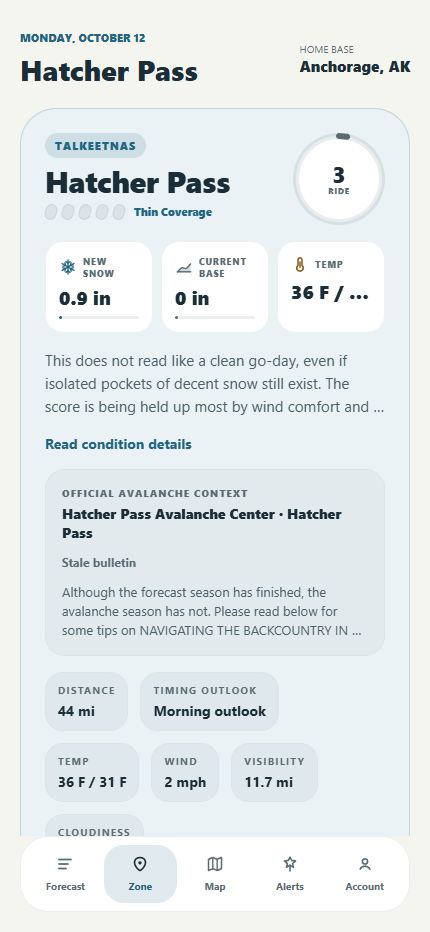
PowShred zone detail screen showing a riding-area forecast
Explore the forecast for a riding zone.

START WITH THE DECISION

Which tool fits your next day out?

PowShred

Compare the riding setup.

Choose PowShred when you want a snow-focused shortlist across supported riding areas, with Ride Score, Snow Tracker, weather-chain explanations, and modeled elevation bands. Its saved-zone feed follows the areas you want to watch.

OnTheSnow

Where it earns a place.

OnTheSnow offers resort webcams, firsthand ski reports and photos, and resort-specific information. Use those observations and the operator’s current status alongside PowShred’s modeled zone outlook when you are heading to a resort.

FOR THE WAY YOU RIDE

What does PowShred add to a backcountry plan?

PowShred is tailored to comparing supported riding zones for skis, boards, and sleds, including backcountry outings. OnTheSnow’s resort reports, webcams, and forecasts are valuable for lift-served plans; PowShred adds a modeled zone score and snow-process explanation.

  • Keep possible backcountry areas in a saved-zone feed instead of organizing the whole trip around resort pages.
  • Compare Ride Score and its drivers alongside snow depth, new snow, and available elevation bands.
  • Watch Pro alerts for a high-scoring riding setup; distinguish that trigger from a resort’s reported snowfall.

SIDE BY SIDE

A feature checklist for riders

Compare the tools for each part of your plan. Features can vary by location and subscription. “Not documented” means the cited product information does not describe that capability.

PowShred and OnTheSnow: capabilities relevant to riding decisions
Your planning taskPowShredOnTheSnow
Compare potential destinationsPowShred Included

Saved and nearby zones ranked by Ride Score, with positive drivers and limiting factors in zone detail.

OnTheSnow Included

My Resorts compares favorites and can sort by distance or recent snowfall; a different ranking basis. [1]

Check resort webcamsPowShred Different approach

PowShred focuses on modeled zone forecasts and does not offer a resort webcam directory.

OnTheSnow Included

Resort webcams and firsthand photos. [1]

Read snow information by elevationPowShred Included

Lower, mid, and upper terrain summaries include modeled snow and wind-scour information where available.

OnTheSnow Included

Resort forecasts with base and summit elevations and mid-mountain conditions. [1]

Read the modeled weather chainPowShred Included

Weather-chain timeline and score explanations show modeled influences such as warming, rain, crust, and wind.

OnTheSnow Different approach

Firsthand reports add observations from people at the resort. [1]

Receive snow-related alertsPowShred Paid feature

Saved-zone alerts, daily digests, weekend outlooks, and nearby Goldilocks alerts. Email and push options.

OnTheSnow Included

Powder alerts for new snow at favorite resorts; a different trigger from Ride Score. [1]

A SNOW-DAY PLANNING EXAMPLE

A promising forecast, but you are heading to a ski resort

A good-looking regional snow setup is one part of planning a lift-served day. Resort observations and operations answer additional questions.

  1. Shortlist the snow setup

    Compare supported zones in PowShred by Ride Score or depth. Review elevation bands and weather history for the date you are considering.

  2. Add recent observations

    Resort reports, webcams, and firsthand photos can show information a modeled zone forecast cannot. Check timestamps and distinguish recent snowfall from total base depth.

  3. Verify the resort plan

    Confirm opening information and access with the operator. A PowShred zone may cover terrain around a resort; its boundary is not an official trail or lift-operating boundary.

INSIDE POWSHRED

Read the setup behind the snow total.

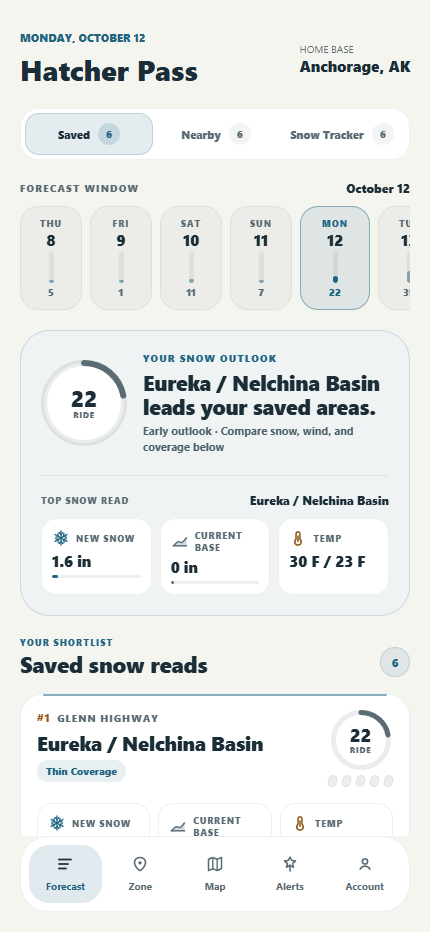
Start with nearby or saved zones, then switch between Ride Score and Snow Tracker. Open a zone for the weather chain, score drivers and penalties, terrain bands, hourly temperature and daylight, and a 14-day outlook with confidence labels.

Core feed, map, and area outlooks are free. Pro adds saved-zone alerts, daily digests, weekend outlooks, and nearby Goldilocks alerts for high-scoring setups. Email and push delivery are configurable.

Estimated depth adds forecast snowfall to current depth; it excludes settling, melt, and wind redistribution. Coverage and data availability vary by zone. Ride Score is planning context, not an avalanche danger rating. Public avalanche bulletins appear only where mapped and available.
PowShred forecast feed for comparing riding areas
Compare areas before picking a destination.

BEFORE YOU CHOOSE

Questions riders ask

Does OnTheSnow only show past snow reports?

No. Its official app description includes forecasts at base, mid-mountain, and summit elevations, plus webcams, firsthand reports, and powder alerts. PowShred’s comparison centers on modeled riding-zone scores and snow history.

Does PowShred show live resort operations?

PowShred focuses on modeled zone conditions, forecasts, and mapped public avalanche context. It does not establish lift opening, trail grooming, or resort operations. Check operator information for those decisions.

Product references

Features and subscription plans can change. Product information checked November 1, 2026.

  1. OnTheSnow: Official Ski & Snow Report app feature list
  2. OnTheSnow: North America resort webcams

SKIS. BOARDS. SLEDS.

Find the zone.
Watch the window.

Explore the map, save the places you ride, and start comparing the snow setup.

Get PowShred on Google Play ↗